![wellnesscoach-full-white-inline (4).png]](https://customer.wellnesscoach.live/hs-fs/hubfs/wellnesscoach-full-white-inline%20(4).png?height=40&name=wellnesscoach-full-white-inline%20(4).png)
Steps:
-
Unlock your Android phone.
-
Touch and hold anywhere on the Home Screen until the you see the screen as shown below.
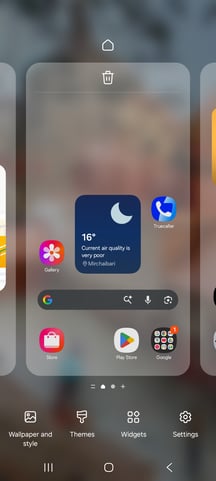
-
Select the “Widgets” button from bottom menu.
-
In the search bar, type Wellness Coach or Scroll till you find Wellness Coach.
.webp?width=212&height=473&name=image%20(1).webp)
-
Select 4x2 Widget Card from the widget list.
-
Tap on Widget and then Add.
-
Drag the widget to your preferred location and its saved.
.webp?width=239&height=533&name=image%20(2).webp)