![wellnesscoach-full-white-inline (4).png]](https://customer.wellnesscoach.live/hs-fs/hubfs/wellnesscoach-full-white-inline%20(4).png?height=40&name=wellnesscoach-full-white-inline%20(4).png)
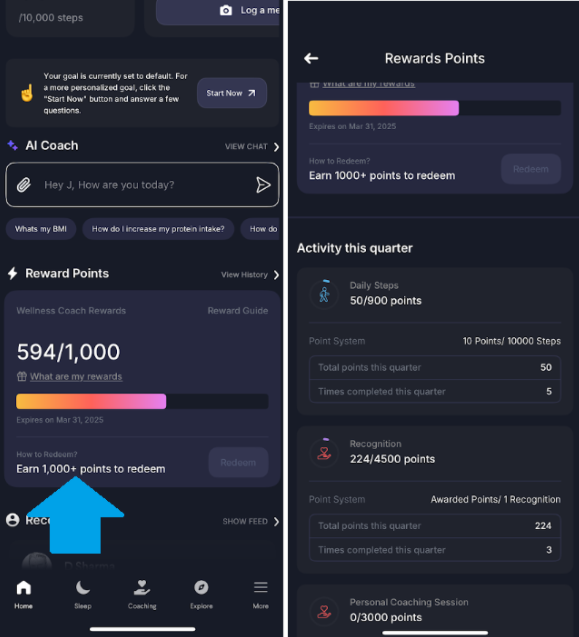
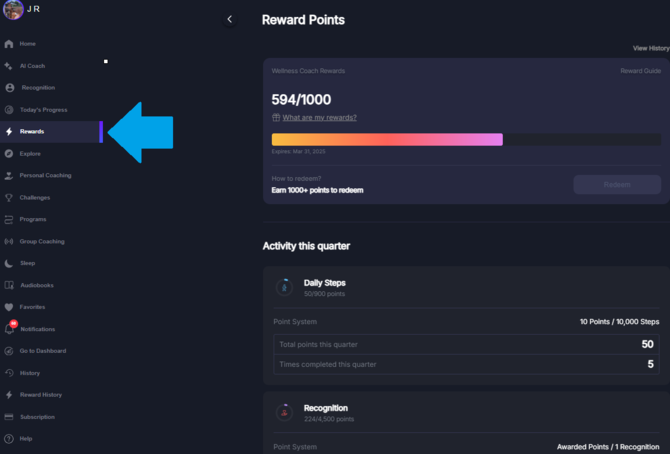
You can earn points by engaging in various activities such as tracking your steps, meditating, staying hydrated, working out, and more, depending on how your company’s program is structured. Once you've accumulated enough points, you can redeem them for Gifted.co gift cards. For example, every 1,000 points can be exchanged for a $25 gift card of your choice.
Note: The point redemption limit and gift card values may vary based on the company.
10-Day Grace Period: We give you a 10-day window to redeem your points for a gift card before they expire after the end of each quarter, so you have extra time to claim your reward!
Here’s how to see which activities earn you points:
Mobile app:
1. Open the Wellness Coach app
2. Tap on the Reward Points option within the app.
3. Scroll down to view them all.
Web app version of Wellness Coach:
1. Open the Wellness Coach web version: Here
2. Tap on the Reward Points option.
3.Tap on Overview and scroll down.
How to Select and Claim Your Gift
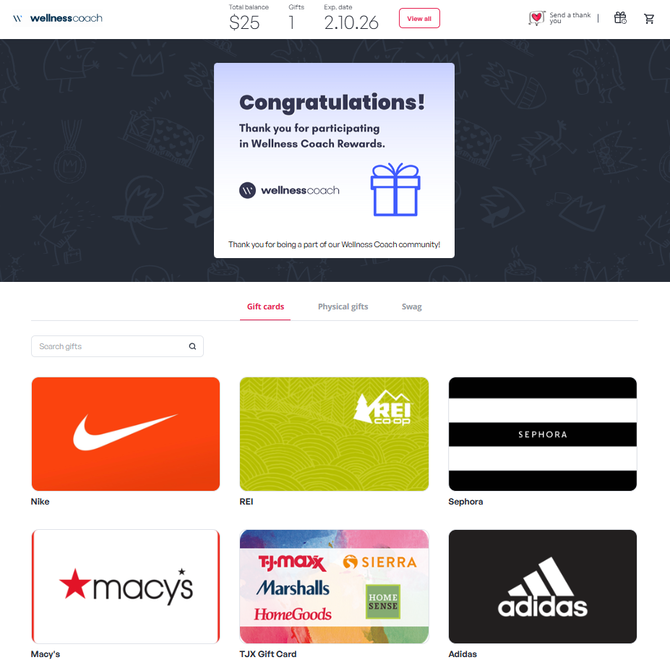
Step 1: Open Your Gift Link
Click the link you received via email or text.
Step 2: Check Your Balance
Your available gift amount appears at the top of the page.
Step 3: Select Your Gift(s)
Browse the brands and choose one or more, as long as your balance covers the total.
Step 4: Enter Amounts and Add to Cart
Type the amount you want for each brand and select Add to Cart.
Before you check out: Be sure to review each brand’s terms and conditions (all sales are final and we are unable to cancel or process exchanges).
Step 5: Review and Checkout
Click View Gifts, confirm your selections, then choose Proceed to Checkout.
Step 6: Verify Your Code
Enter the verification code sent to your email or phone and click Verify. Don't see it? Check your spam folder.
Step 7: Access and Use Your Gift Cards
Your gift cards will be sent to your email and phone. You can also view them anytime under Open Gift Cards, which shows your card numbers, redemption instructions and a print option.
🎥 Prefer to watch? Here's a quick video walkthrough of the whole process:
NOTE: Visit MyPrepaidCenter.com for card balances and usage details.