![wellnesscoach-full-white-inline (4).png]](https://customer.wellnesscoach.live/hs-fs/hubfs/wellnesscoach-full-white-inline%20(4).png?height=40&name=wellnesscoach-full-white-inline%20(4).png)
Steps to Deactivate a User
- Log in to the Wellness Coach Admin Portal.
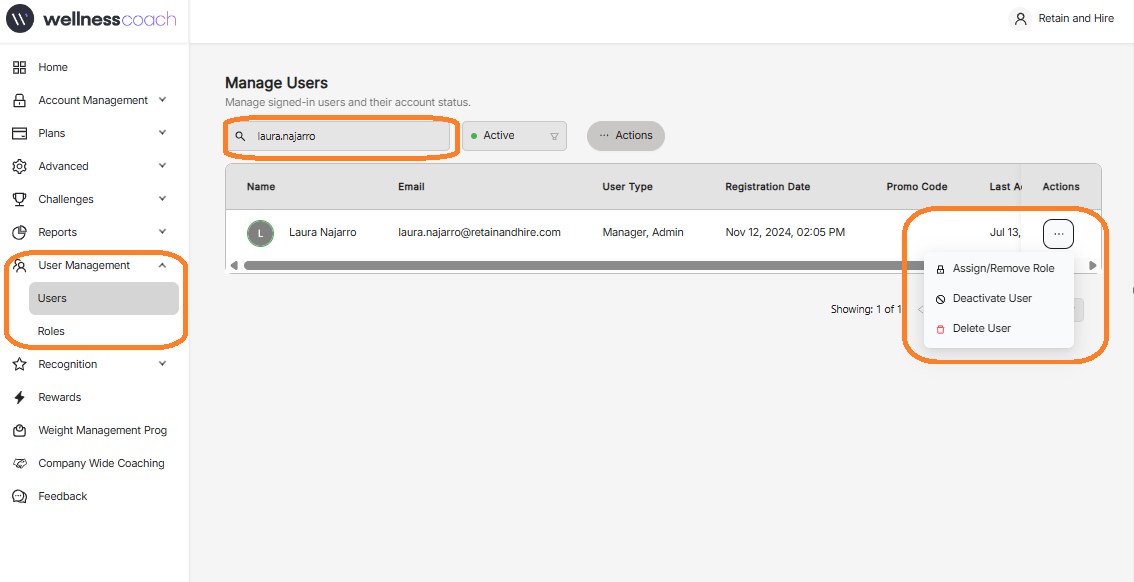
- From the left-hand navigation menu, select User Management.
- Click Users.
- Use the search bar to locate the user you want to deactivate.
- Once you've found the user, click the three dots (...) under Action.
- Select Deactivate User.
- Confirm the action if prompted.
Notes
- Deactivation preserves the user's account and historical data.
- If the user needs access again in the future, an administrator can reactivate their account