![wellnesscoach-full-white-inline (4).png]](https://customer.wellnesscoach.live/hs-fs/hubfs/wellnesscoach-full-white-inline%20(4).png?height=40&name=wellnesscoach-full-white-inline%20(4).png)
If a meal was captured or logged incorrectly, you can easily remove it by following these steps:
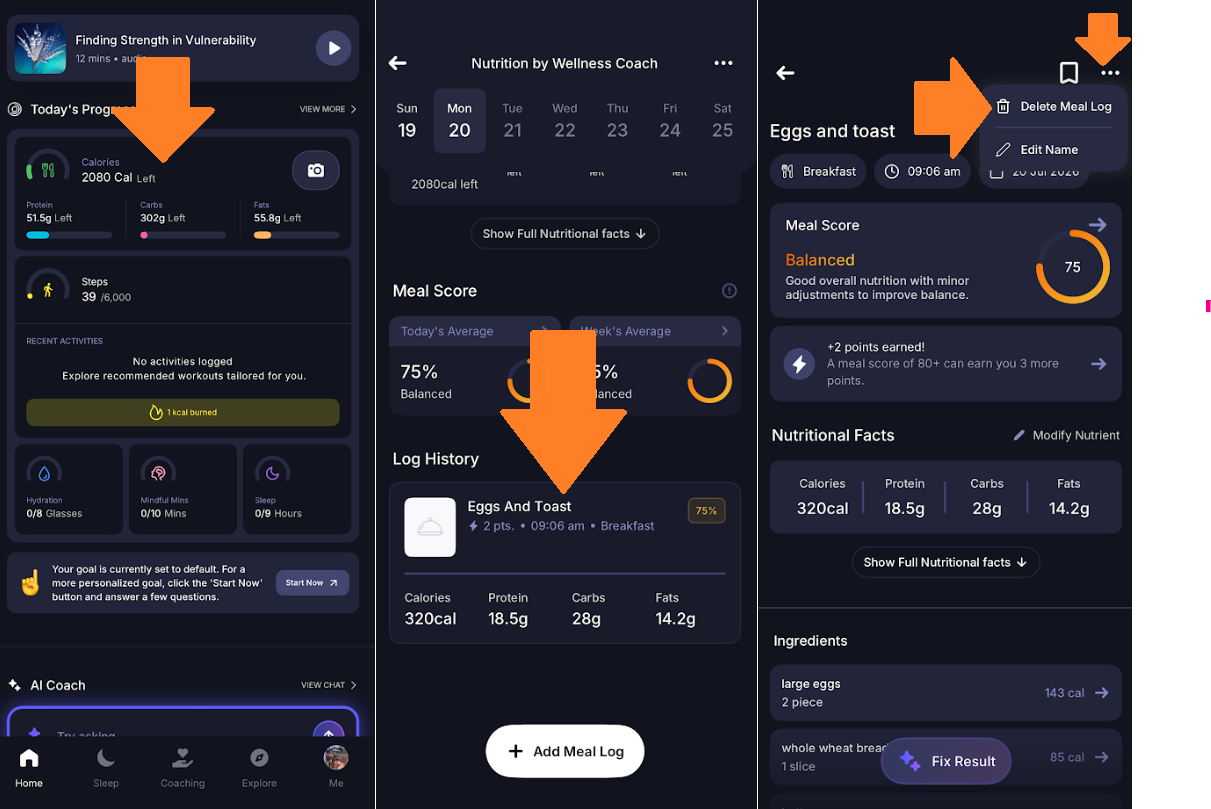
- Open the Wellness Coach app.
- Tap the Calories tab to open Nutrition by Wellness Coach.
- At the bottom of the screen, locate your Logged Meals and tap the meal you want to remove.
- Once the meal opens, tap the three dots (...) in the top-right corner.
- Select Delete Meal Log and confirm the deletion. Your meal will be removed from your nutrition log immediately.
Got questions or facing any issues? Send us a message at support@wellnesscoach.live. We're here to support you all the way!