![wellnesscoach-full-white-inline (4).png]](https://customer.wellnesscoach.live/hs-fs/hubfs/wellnesscoach-full-white-inline%20(4).png?height=40&name=wellnesscoach-full-white-inline%20(4).png)
Mixed-Mode challenges combine several activity types into a single challenge, so you can work toward your wellness goals in more than one way. A challenge may include Calories Burned, Content, Nutrition, Personal Coaching, AI Coach Conversations, Sleep, Steps, Water Intake, and Workout Minutes. The activities in each challenge depend on its goal, so the combination can change from one challenge to the next.
Step-by-Step Guide: How to Navigate and Complete Mixed-Mode Challenges
- Open your Wellness Coach App and go to your home screen.
- Go to the Challenges section on the left sidebar.
-2.png?width=670&height=329&name=Untitled%20design%20(9)-2.png)
- Select the Mixed-Mode challenge and click "Join Challenge"
.png?width=670&height=435&name=Untitled%20design%20(11).png)
- Where can I see my tasks for the day?
The Daily Tasks tab lists your tasks for each day of the challenge. Since this is a mixed-mode challenge, your tasks depend on the activities you chose. A new day's tasks unlock once the previous day ends.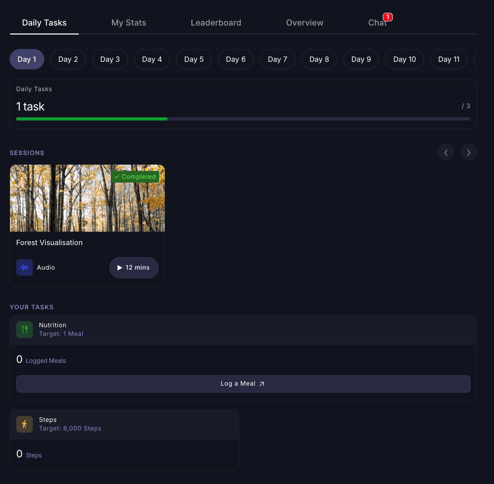
- Where can I see my overall progress and stats?
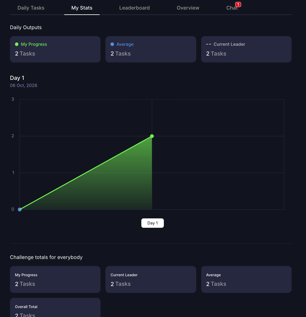
Under "My Stats," you can track your daily progress, compare it with the current leader's, and see your daily average, the number of tasks you've completed per day throughout the challenge.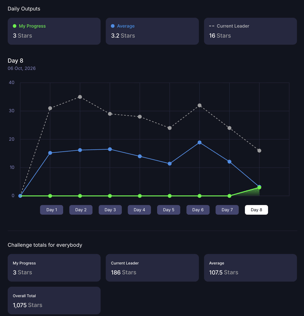
- How points work in Mixed-Mode Challenges:
Stars: Each task is worth a set number of stars, and different tasks can be worth different amounts. You earn that task's stars when you complete it, so your score is the total stars you've collected.
Tasks completed: Every task counts the same. Your score is simply the number of tasks you've completed.
How are ties resolved?
If two or more team members have the same score, the tie is broken by completion time. Whoever completed the tasks first gets the higher position.
Does my time zone matter?
No. Each team member's completion time is recorded in their own local time zone, and those times are compared directly. You won't gain or lose an advantage because of where you are. The earliest local completion time wins.Example:
- Anna completes the tasks at 9:00 AM her local time.
- Mark completes the tasks at 9:30 AM his local time.
Anna's completion time is earlier, so Anna takes first place, whichever time zones they're in.
- How do I see my team's rankings?
Go to the Leaderboard tab to view your team's rankings, sorted by tasks completed or stars earned.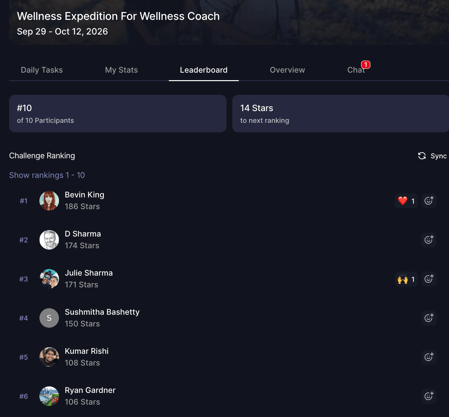
- Where can I find the challenge details?
Go to the Overview tab to see the challenge details, the actions you can take, and a support contact if you need help. - Can I message other participants in the challenge?
Open the Chat to take part in team conversations, encourage your colleagues, and celebrate their wins.
Support
Live Support
Schedule a live support session with our team for real-time, face-to-face help whenever you need it.
Learn more about how to book
[Book live support]
Email Support
Reach out to support@wellnesscoach.live for assistance. This contact is also available directly inside the app. Responses may take up to 24 hours.
[Email us]