![wellnesscoach-full-white-inline (4).png]](https://customer.wellnesscoach.live/hs-fs/hubfs/wellnesscoach-full-white-inline%20(4).png?height=40&name=wellnesscoach-full-white-inline%20(4).png)
Step-by-Step Guide: Sign Up with SSO
1. Click here or head to the App Store if you're using an iOS device, or the Google Play Store for Android users. Search for Wellness Coach and download the app to your smartphone or tablet.
2. Make sure you have your organization's Single Sign-On (SSO) configured on your phone to access your account. If you are setting up a new device or logging in for the first time, please contact your local IT team for assistance.
3. After installing the app, open it. You'll be prompted to enter the Name of your company and create the account using your first name, last name, and work email. This step helps ensure you're part of your organization's community.
.jpeg?width=253&height=566&name=WhatsApp%20Image%202026-09-15%20at%2010.33.53%20(1).jpeg)
.jpeg?width=254&height=567&name=WhatsApp%20Image%202026-09-15%20at%2010.33.53%20(2).jpeg)
4. When you log in, the system will identify the SSO app your company uses and will redirect you there.
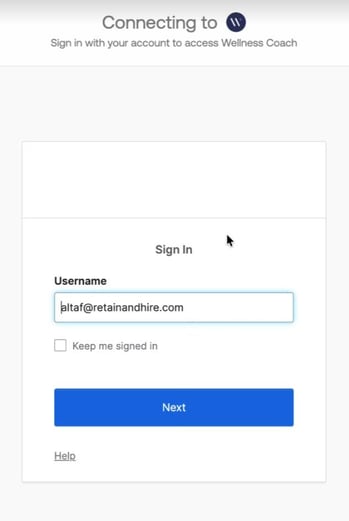
Note: If your workplace uses Single Sign-On (SSO), you'll need to use that to log in to Wellness Coach. Please make sure to create your account with your work email, not a personal one. This way, you'll be taken to the correct SSO page.
If you encounter an error, please contact your local IT team. They can assist with configuring SSO on your device so you can successfully access your Wellness Coach account.
5. After setting up your information, enter the 4-digit code sent to your email.
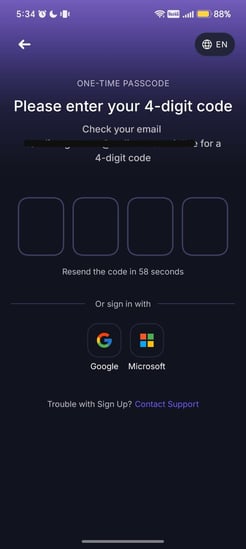
5. [Optional] Set up Face ID for quick access the next, for the next time
.jpeg?width=246&height=550&name=WhatsApp%20Image%202026-09-15%20at%2010.33.53%20(3).jpeg)
6. Once you've completed these steps, you're all set to dive in and start exploring the app!
At the moment of logging in, our system automatically detects your location and sets the app to the local language, allowing you to get started seamlessly.
What happens if you can't find your account?
Automatic Account Migration: Don't worry if you accidentally use your personal email. We'll automatically connect your personal email to your work account so get access to your company's sponsored Wellness Coach plan.
Support
Live Support
Schedule a live support session with our team for real-time, face-to-face help whenever you need it.
Learn more about how to book
[Book live support]
Email Support
Reach out to support@wellnesscoach.live for assistance. This contact is also available directly inside the app. Responses may take up to 24 hours.
[Email us]