![wellnesscoach-full-white-inline (4).png]](https://customer.wellnesscoach.live/hs-fs/hubfs/wellnesscoach-full-white-inline%20(4).png?height=40&name=wellnesscoach-full-white-inline%20(4).png)
Why Admin Consent is Required & How it Helps Users
Microsoft Entra ID’s default security policy requires an administrator to approve any third-party app requesting access to chat or channel data.
Granting tenant-wide consent once removes this friction for everyone. Once approved, all users in your organization can seamlessly use the app's sharing and notification features without encountering blocker prompts.
Enterprise Data Security & Privacy
- Strictly Scoped (Delegated Access): For all sharing features, the app only acts as the signed-in user and can only access data that specific user already has permission to see. It cannot read private messages outside the user's context or operate without an active session.
- Send-Only Notifications: The single application permission used (
TeamsActivity.Send) is strictly send-only. It allows the app to drop wellness reminders and challenge updates into the Teams activity feed but cannot read any messages, channels, files, or directory data.
The Core Feature Permissions
You only need to approve the permissions for the features your organization actively intends to use:
|
Feature |
Key Graph Permissions |
Why It's Needed |
How It's Triggered |
|
|
Lets users view their team/channel lists and share wellness content into a channel. |
User-Triggered: Prompted when a user first shares to a channel. |
|
|
Lets users find recent chats, create sharing loops, and send content via DMs/Group chats. |
User-Triggered: Prompted when a user first shares to a chat. |
|
|
Delivers proactive wellness reminders and session alerts directly into the Teams bell icon. |
Admin-Triggered: Granted at your discretion; no user action required. |
Note: Basic sign-in (
User.Read) is classified as low-impact and is granted automatically upon a user’s first login. No admin action is required for basic access.
How to Grant Consent via Microsoft Entra Admin Center
Administrators can proactively grant tenant-wide consent directly from the Entra portal to prevent users from seeing "Approval Required" screens.
Option A: Granting via a User's Approval Request (2 Minutes)
If a user has already attempted to use a sharing feature, they will have triggered an admin entry:
- Sign in to the Microsoft Entra admin center as a Global or Cloud Application Administrator.
- Navigate to Entra ID → Enterprise apps → Admin consent requests.
- Click on the Wellness Coach request.
- Click Review permissions and consent.
- Critical: Check the box that says "Consent on behalf of your organization" in the Microsoft dialog, then click Accept.
Option B: Proactively Granting Consent Directly (Direct Flow)
If you want to set up the app permissions (including Optional Push Notifications) before rolling it out:
- Sign in to the Microsoft Entra admin center.
- Navigate to Entra ID → Enterprise apps → All applications.
- Search for Wellness Coach and click to open its overview.
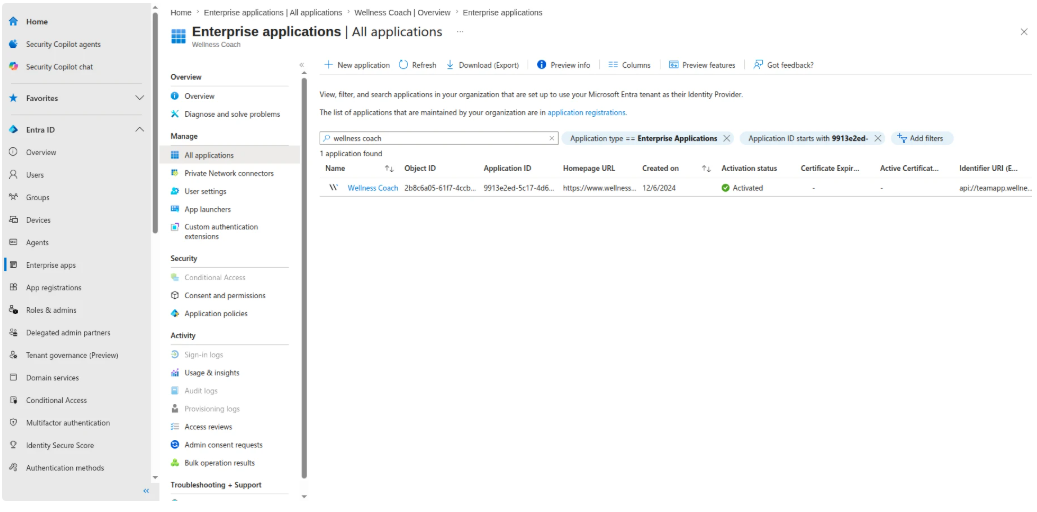
- Under the left sidebar menu, click on Permissions.
- Click the blue "Grant admin consent for [Your Tenant Name]" button at the top of the workspace.
- Review the permissions list in the Microsoft pop-up window and click Accept.
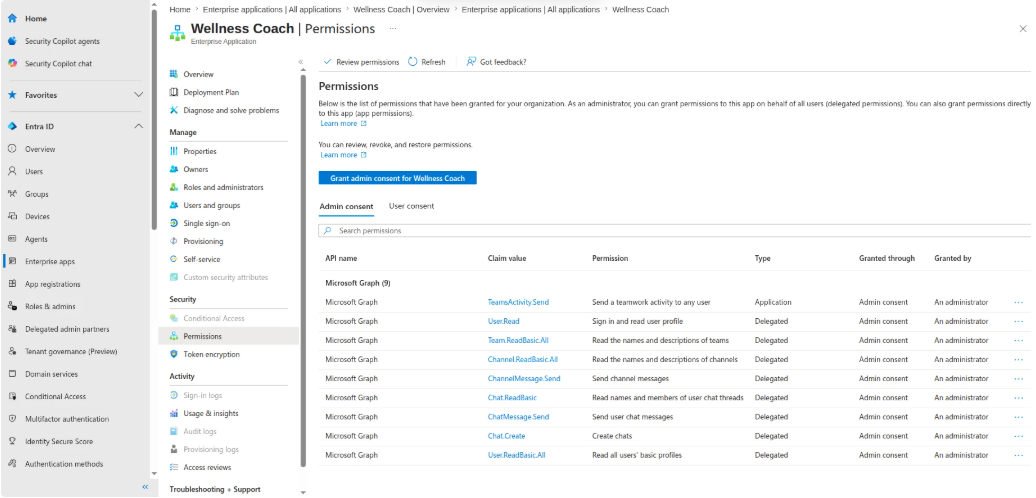
Once completed, the permissions will display under your tenant's active registry. All users can immediately leverage the approved features smoothly without any further prompts.