![wellnesscoach-full-white-inline (4).png]](https://customer.wellnesscoach.live/hs-fs/hubfs/wellnesscoach-full-white-inline%20(4).png?height=40&name=wellnesscoach-full-white-inline%20(4).png)
1. Watch Tutorial Video here
2. Access Guide Flyer here
3. See Full Guide Here
Step-by-Step Guide: Accessing ClassPass Services
Note: While the screenshots below show the desktop app, you can follow the exact same steps on your phone using the mobile app.
Creating a ClassPass account for the first time
-
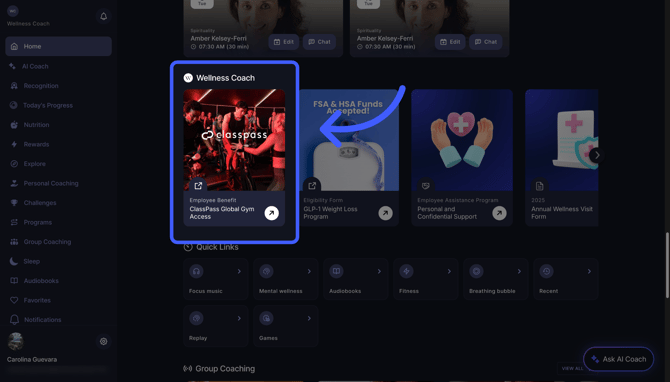
Open the Wellness Coach app. and from the home screen, scroll down to your employer’s name — just below, you’ll find a carousel of cards.
-
Tap the card titled “ClassPass Global Gym Access”
-
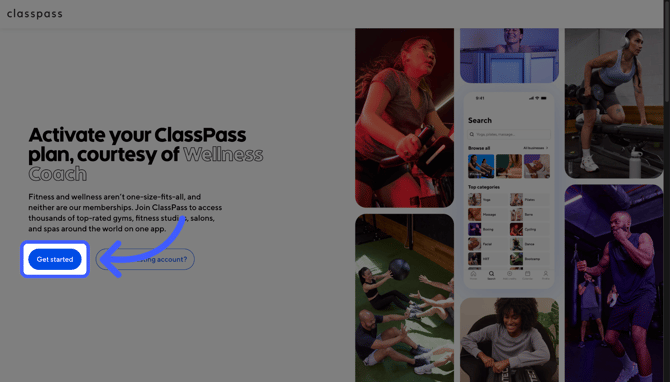
You will be redirected to the ClassPass website. Click Get started to begin setting up your account.
- Log in and activate your ClassPass account using your work email adress.
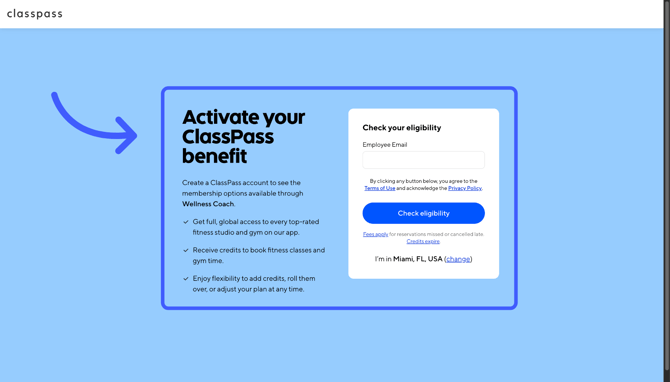
Note: This sign-up process is for new ClassPass users. If you already have an active ClassPass membership, you will need to transition your account to your sponsored plan.
Other Helpful Links:
Support
Live Video Support
Schedule a live support session with our team for real-time, face-to-face help whenever you need it.
Learn more about how to book
[Book live support]
Email Support
Reach out to support@wellnesscoach.live for assistance. This contact is also available directly inside the app. Responses may take up to 24 hours.
[Email us]