![wellnesscoach-full-white-inline (4).png]](https://customer.wellnesscoach.live/hs-fs/hubfs/wellnesscoach-full-white-inline%20(4).png?height=40&name=wellnesscoach-full-white-inline%20(4).png)
1. Watch Tutorial Video here
2. Access Guide Flyer here
Step-by-Step Guide: Finding the Explore Page
Note: While the screenshots below show the desktop app, you can follow the exact same steps on your phone using the mobile app.
-
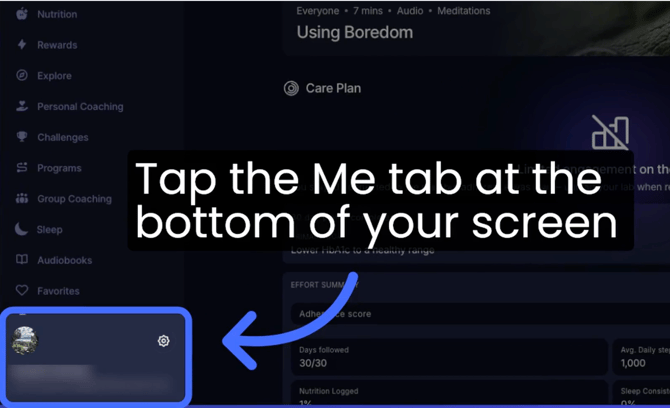
Open the Wellness Coach app and tap Me (or your name) in the bottom navigation menu.
-
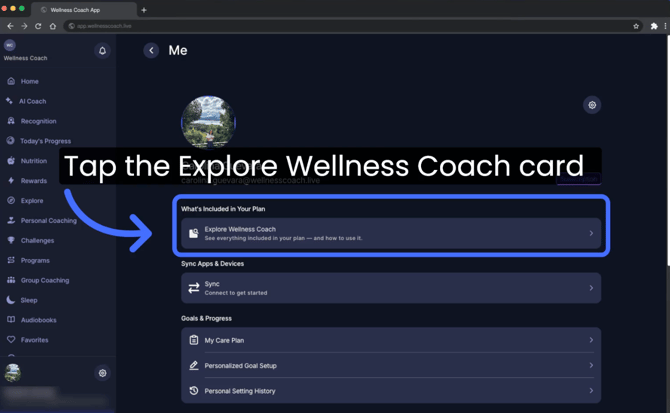
Select "What’s Included in Your Plan" Click the banner at the top to open your personalized library of features.
-
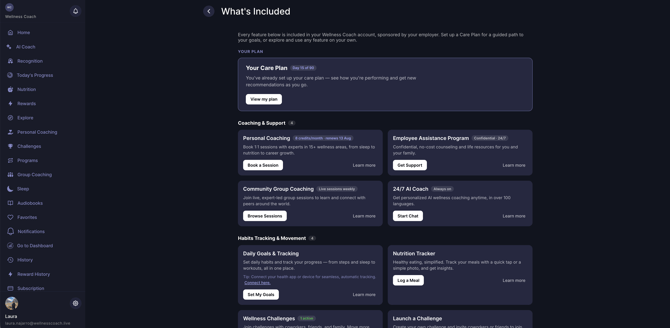
Explore your feature cards That's it! You'll see a dedicated card for every feature included in your plan.
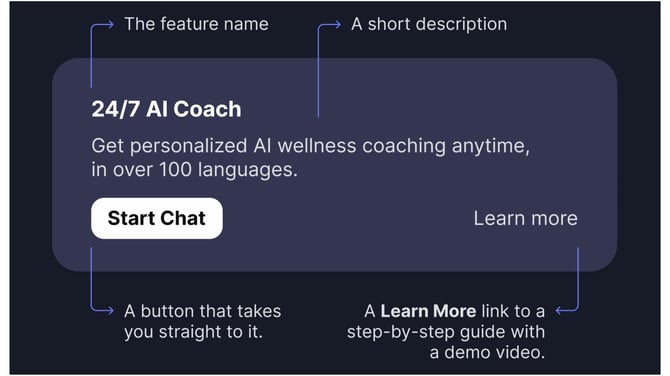
Inside each card, you'll find:
 Please note: Features shown in the images are illustrative only and may not reflect exactly what’s included in your plan.
Your Connections and Dependents also get access to this same page, tailored to what’s included in their plan.
Support
Live Video Support
Schedule a live support session with our team for real-time, face-to-face help whenever you need it.
Learn more about how to book
[Book live support]
Email Support
Reach out to support@wellnesscoach.live for assistance. This contact is also available directly inside the app. Responses may take up to 24 hours.
[Email us]