![wellnesscoach-full-white-inline (4).png]](https://customer.wellnesscoach.live/hs-fs/hubfs/wellnesscoach-full-white-inline%20(4).png?height=40&name=wellnesscoach-full-white-inline%20(4).png)
-
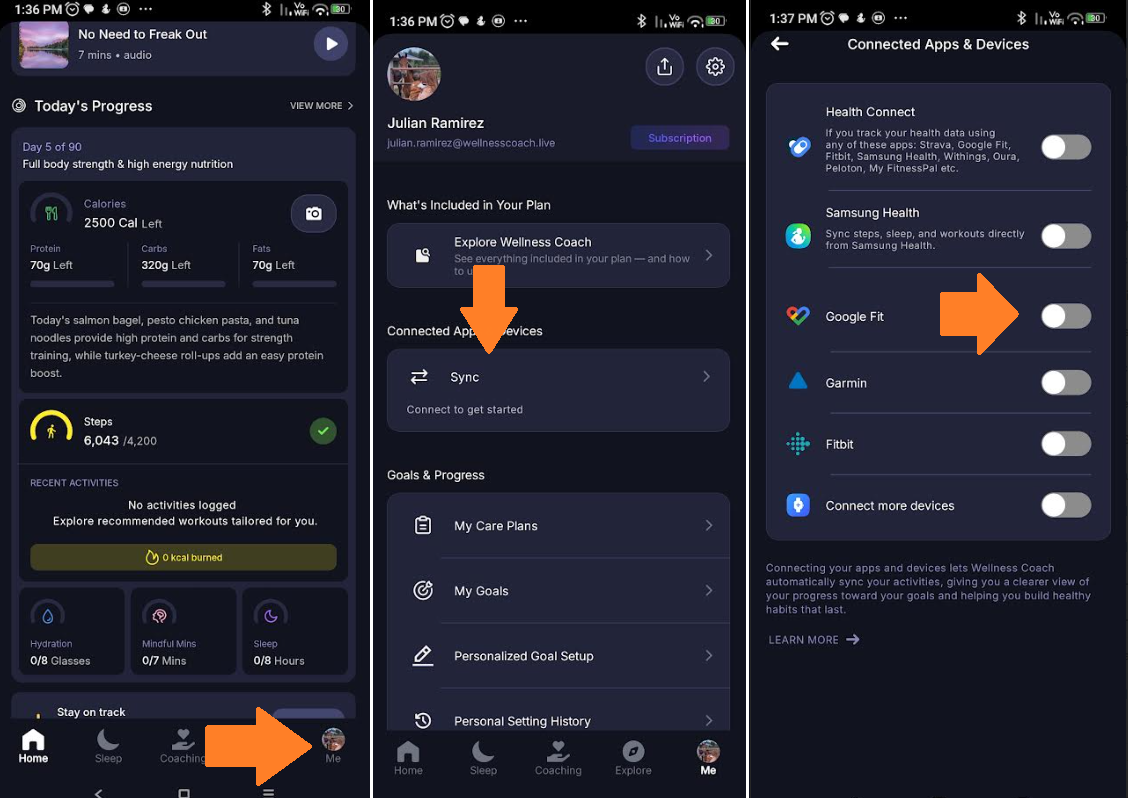
Open up your Wellness Coach app on your phone and tap on the 'Me' option at the bottom of the screen.
- Under Connected app and Devices, proceed and tap on Sync.
-
Toggle Google Fit on.
-
Make sure you're selecting the same email account for Wellness Coach and Google Fit and allow permissions. Voila! The pairing process is complete
Get ready to crush those fitness goals like never before!
Got questions or facing any issues? Send us a message at support@wellnesscoach.live. We're here to help!