![wellnesscoach-full-white-inline (4).png]](https://customer.wellnesscoach.live/hs-fs/hubfs/wellnesscoach-full-white-inline%20(4).png?height=40&name=wellnesscoach-full-white-inline%20(4).png)
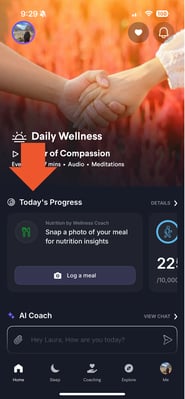
Guess what? Now you can effortlessly add your activities and workouts straight to Wellness Coach! Isn't that awesome? Just a heads up, some challenges might not support manual entries, but no worries, some do! It all depends. For those challenges that don't support manual entries, you can simply track them with your trusty wearable fitness watch.
1. On your home screen tap on "Details" under "Todays Progress". In the next page tap on "Activities/Workouts.
.png?width=183&height=395&name=Phone%20Mockups%20Frame%20(1).png)
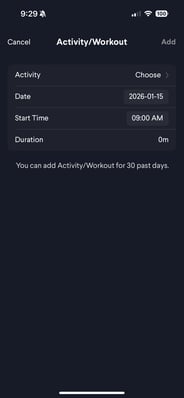
2. Click on "ADD" in the next page under "Activity" tap on "Choose" and select the workout or activity from the dropdown menu.
.png?width=185&height=400&name=Phone%20Mockups%20Frame%20(2).png) .
. 
.png?width=185&height=400&name=Phone%20Mockups%20Frame%20(3).png)
3. Once you choose the activity or workout. Select date, start time and duration. You will now see the activity or workout saved and updated in your progress.
.png?width=185&height=400&name=Phone%20Mockups%20Frame%20(4).png) .
. .png?width=185&height=400&name=Phone%20Mockups%20Frame%20(5).png)
Note: You can do the same for Steps, Sleep, Mindful Minutes, and Active Calories.
Got questions or facing any bumps? Send us a message at support@wellnesscoach.live. We're here to ensure your experience is nothing short of fantastic!