![wellnesscoach-full-white-inline (4).png]](https://customer.wellnesscoach.live/hs-fs/hubfs/wellnesscoach-full-white-inline%20(4).png?height=40&name=wellnesscoach-full-white-inline%20(4).png)
Note: Please reconnect your Fitbit by September 30th, 2026
Why? Google is updating how Fitbit shares your activity with other apps, like Wellness Coach. The current connection will stop working after September 30, 2026, so you just need to reconnect once.
Here is how:
- Go to your Profile and tap Sync
Open Wellness Coach, go to your Profile, and tap Sync under “Sync Apps & Devices.”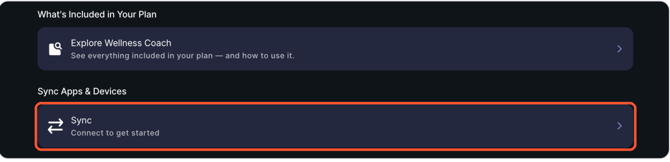
- If Fitbit is still turned on, switch it off first. Then switch Connect more devices on. This is where Fitbit lives now.
NOTE: If this is your first time connecting Wellness Coach as a Fitbit user, ignore the turn off step, just to straight to "Connect more devices"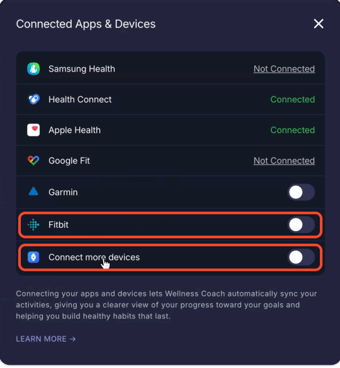
- Tap Continue, then choose Google Health: You’ll see a page from Terra, our trusted partner that securely connects your Fitbit to Wellness Coach. Tap
Continue, then pick Google Health and tap Connect.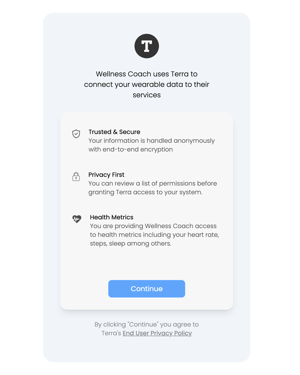
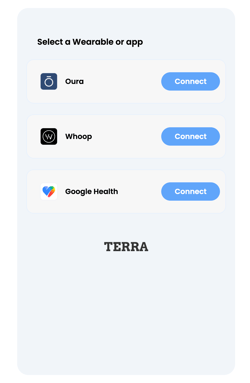
- Choose your account: Sign in with the Google account linked to your Fitbit.
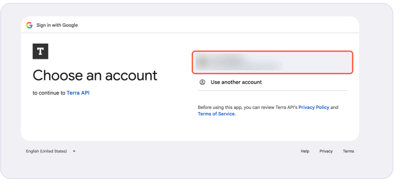
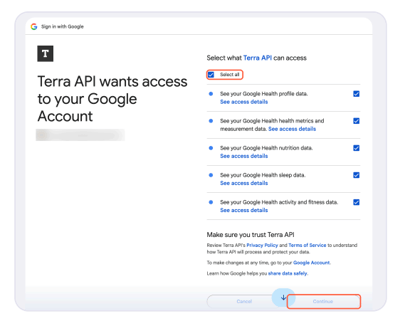
- Allow access and tap Continue: Choose what Terra API can access. We recommend selecting all so everything syncs, then tap Continue.
That’s it! Your Fitbit is connected to Wellness Coach again. Your steps and activity will keep syncing, and you can keep joining challenges and tracking your progress.
Got any questions? Send us a message at support@wellnesscoach.live. We're here to help!