![wellnesscoach-full-white-inline (4).png]](https://customer.wellnesscoach.live/hs-fs/hubfs/wellnesscoach-full-white-inline%20(4).png?height=40&name=wellnesscoach-full-white-inline%20(4).png)
After each personal coaching session, Wellness Coach can generate an AI Meeting Summary, a concise recap of your session that captures key discussion points, insights, goals, and action items. This helps you stay on track between sessions and gives your coach the context they need to make every follow-up session more effective.
How It Works:Enabling AI Summaries happens during your normal booking process. No complicated setups required.
- Book as Usual: Select your coach, date, and time, and click "Book Session."
- Before your booking is finalized, a pop-up will appear reviewing your session details.
- Choose What to Share: Among the sharing options (activity, workouts, sleep, biometrics, nutrition), select "AI Meeting Summaries."
- Click on "Authorizations," agree to the privacy policy, and click "Continue" to finish booking.
That's it! Once your session ends, the AI Summary is automatically generated for you.
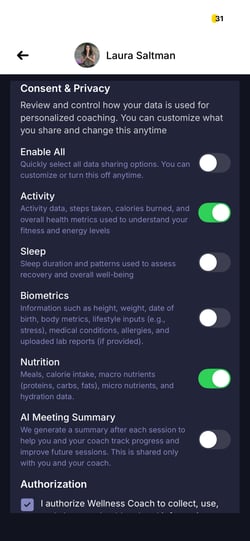
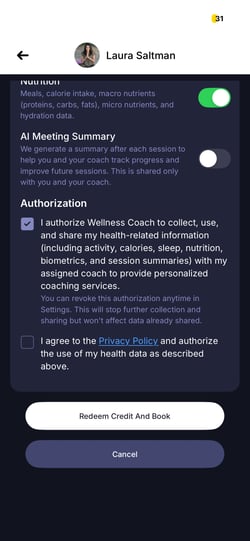
Your AI Summary choice is linked to each coach. The first time you book a particular coach, the option starts off. Once you turn it on for that coach, your choice carries over to future sessions with that same coach and will appear pre-selected, you can review and change it at any booking. Booking a different coach always starts fresh with the option off. You can also update your choice anytime in settings.
Where Does My AI Summary Go?
After your coaching session is complete:
- To Your Email: A copy of the AI Summary is sent directly to the email ID registered with your Wellness Coach account, so you always have a record of your session takeaways.
- Your AI Summary is delivered to the email address registered to your account. If that's a work, shared, or employer-managed inbox, others with access to it may be able to see the summary. Check which address is registered before enabling and update it in settings if needed.
- Once a summary email has been sent, it can't be recalled or deleted from inboxes it reached.
- To Your Coach: Your coach also receives the summary, allowing them to review your progress, prepare for upcoming sessions, and provide continuity in your coaching journey.
We believe your session data belongs to you. Here's how we keep your AI Summaries safe and private:
- Consent First: AI Summaries are only generated and shared if you opt in during booking. No consent, no summary.
- Coach-Specific Access: Your AI Summary is only visible to the specific coach you had the session with. Other coaches or team members cannot see it.
- Flexible Control: Your permissions are confirmed during booking, but they aren't permanent. You can revoke or update your AI Summary sharing preferences at any time.
To manage your preferences: Go to Personal Coaching > My Coaching > click "Manage Data Sharing." .jpg?width=250&height=423&name=IMG_8295%20(1).jpg)
Frequently Asked Questions (FAQ)
Do I have to enable AI Summaries to book a coach?
No. AI Summaries are entirely optional. You'll still receive incredible support from our coaches whether or not you choose to enable them.
Who receives the AI Summary after my session?
The summary is sent to the email ID registered with your Wellness Coach account and to the coach you had the session with.
What if my registered email is outdated?
Update your email address in your account settings to make sure summaries reach the right inbox. Summaries are always sent to the email currently registered with us.
Can I turn off AI Summaries after enabling them?
Yes. You can update or revoke your sharing preferences at any time through your account settings or by managing your upcoming sessions under "My Coaching." Turning off AI Summaries stops future summaries from being generated, but does not recall summaries already sent.
Is my session recorded?
AI Summaries capture the key points of your session for your benefit. They are generated only with your consent and handled according to our privacy policy.
Resources: