![wellnesscoach-full-white-inline (4).png]](https://customer.wellnesscoach.live/hs-fs/hubfs/wellnesscoach-full-white-inline%20(4).png?height=40&name=wellnesscoach-full-white-inline%20(4).png)
1. Watch Tutorial Video here
2. Access Guide Flyer here
Step-by-Step Guide: Join a Team Coaching Session
-
Any available or upcoming team coaching sessions for your organization will be listed under the Group Coaching section. Click "Group Coaching"in the sidebar or scroll down to locate the section.
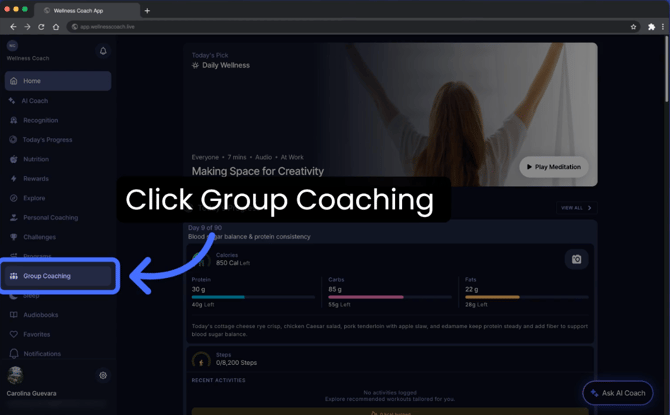
- To identify your team coaching session, look for your company's name displayed directly in the header of the session card.

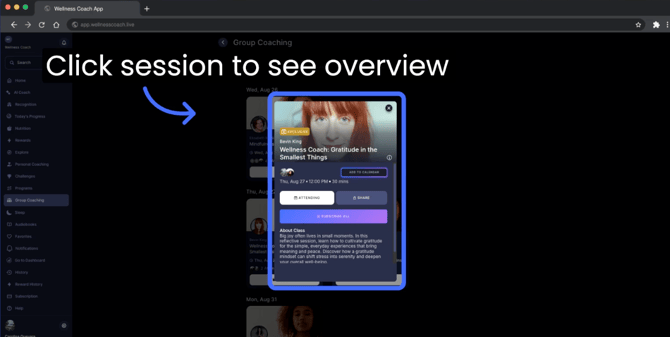
- Click on a session to open the overview pop-up. From there, click "Attending" to join, and click "Add to Calendar"so you don't miss it.
To join a team coaching session, you must first register for your free employee wellness coach benefit if you haven't already. Learn how to register here.
Other Helpful Links:
Support
Live Video Support
Schedule a live support session with our team for real-time, face-to-face help whenever you need it.
Learn more about how to book
[Book live support]
Email Support
Reach out to support@wellnesscoach.live for assistance. This contact is also available directly inside the app. Responses may take up to 24 hours.
[Email us]